Home / Blogs / What Is a Content Management System (CMS)? A Complete Guide to Choosing the Right One

It is very important to have a visible website for any business in this digital age. Having a professional website not only helps to grow your businesses but also it increases your online presence in the global platform. And a professional website needs to update relatable content to increase its visibility. With the help of a content management system (CMS) anyone without technical expertise in a website may easily manage content.
Content management system a back-end system that allows you to manage the content of the website. It allows users to create, publish, and update content easily without any prior expertise of coding or technical skills.
The Content Management System works with two key components. Both of the components work together to ensure the visibility of the website.
Content Management Application (CMA) is a part of CMS and directly accessible to the users. It is also known as a dashboard or administer panel. The user can create new content, edit the old one or delete it without any errors to the website. And with the help of basic available tools, users can also add text, images, videos, and other media easily.
The Content Delivery Application or CDA works as a background application. It shows the content produced by the CMA to the visitors of the site. The CDA gathers the necessary content in the database with the use of themes and templates when the users visits the webpage.
Anyone can use a Content management system but it is especially useful for those who are involved in content writing and e-commerce. One can used CMS without having much technical knowledge
Bloggers and Content writers: Bloggers and content producers use the CMS platform largely. It enables bloggers, writers, and other digital content producers to publish their articles, upload images, and videos.CMS also has SEO friendly features which allows writers to make their work more technical and creative.
Small and Large Businesses: Lately, many small and large businesses used content management systems. They can simply update their products, services, goods and announcements. It helps them to establish their products and services globally. It is a very cost effective way for businesses to promote branding and customer involvement.
Students: A CMS can also play an important role in students' lives. It is beginner friendly and you don't need much technical skills. It helps students to make their personal portfolios website and for college projects. They can also develop technical knowledge while creating and maintaining it.
E-commerce: A CMS is the effective way for e-commerce to manage their business. It helps online stores to update products, pricing, uploading images, and manage customer orders and payments. Additionally it also allows owners to handle shipping details, track payments, and manage customer orders from one location.
Organizations and Institutions: Many organizations and institutions, including government offices, non-profits, schools, and colleges used Content Manage System. It helps to update information to their users about announcements, events and notices. It also allows numerous individuals as admin, editor, and author work at the same time in the same website.
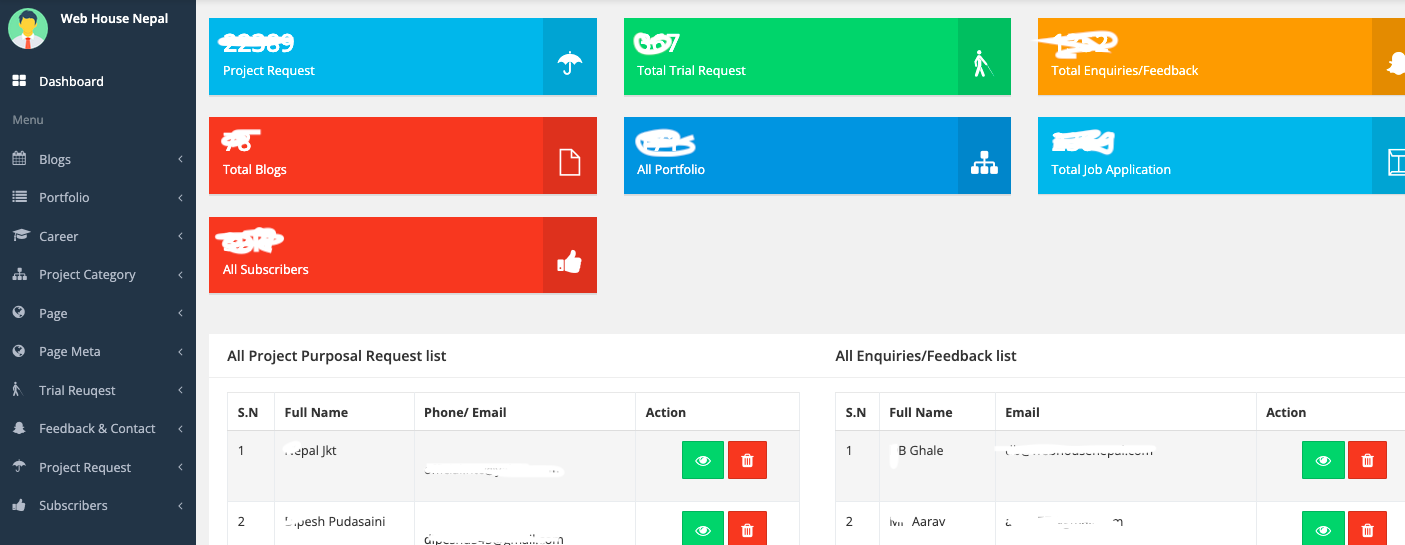
Easy to use: CMS is one of the easiest ways to update and create content for the website. You don't need years of experience and technical knowledge in coding like HTML and css. Anyone from anywhere can simply update the content of your website with the use of simple dashboards.
Saves both time and money: Another significant benefit of using a content management system is that it saves your time and is cost effective. You don't need developers to manage and update your content. And some CMS like Wordpress, Drupal and Joomla are either free or open source which ultimately reduce your cost of development and maintenance.
Easy update and maintenance: CMS offers easy updates where one can easily add,edit or remove content without affecting the website. You can also add videos, photos and text at any time and can also unpublish the content if you feel it’s not relatable. Furthermore, CMS also offers content scheduling which enables your content to be published automatically.
Seo Friendly: CMS is SEO friendly helping to increase the visibility of your website through the content. Users easily add meta titles, descriptions, and keywords.
Keeps content organized: A CMS makes content well organised. You can easily update, edit and delete content through categories, tags, menus and sections.
1. Traditional CMS
A Traditional CMS is mainly used by large companies and organizations. It is useful when a business needs high control, customization, and system integration.
Traditional CMS is commonly used in healthcare, finance, and government industries, where security and complex systems are important.
2. Open-Source CMS
For small to medium-sized businesses, An Open-Source CMS best option to use. It is also very popular for personal blogs and business websites. Most of the user are very used to open source CMS systems.
Popular examples include WordPress, Drupal, and Joomla. These platforms are widely used in eCommerce, education, and non-profit organizations. bizmandu, ictframe, mofa gov are some of the popular websites that operated using open source cms (wordpress).
3. Cloud-Based CMS
A Cloud-Based CMS runs on the internet (cloud) and does not require installation on a local computer or server.
CB CMS is getting more popular among users and companies as it is easy to use, affordable, and scalable. All sizes of entrepreneurs and businesses can handle it without any tech difficulties.
Popular cloud-based CMSs are Wix, Squarespace, and Shopify that help users to manage websites and online businesses easily. All features and tools are easy to understand for any non coding personality.
4. Headless CMS
A Headless CMS is a modern type of CMS where the front end and back end are completely separate.
Front end: What users see, visible elements (text, images, layout).
Back end: Where content, database, and settings are managed.
In a headless CMS, there is no fixed front end. Content is sent using APIs and can be shown on websites, mobile apps, or other platforms.
A headless CMS gives developers more control, runs faster, and helps show content on many devices.
To select the best CMS for one's needs, you have to identify the purpose of one's website.Here’s the list of some points that helps you to choose the best CMS:
Know your website purpose:The first thing one should know while choosing CMS is knowing your website goals. According to the websites, CMS roles are different according to there needs. Whether you need a CMS for business, educational platforms, ecommerce or for portfolios.
Budget: Budget plays an important role in choosing the right CMS. Many CMS are open source and free to use, but some CMS are expensive due to its hosting, backup, setup and maintenance cost being different.
Customize option: Some e-commerce and large businesses need to have an adaptable CMS option as it enables businesses to make their web page as their branding and functionality requirements. Customising CMS gives access to change template, theme and features.
SEO features: SEO features are necessary to make websites more visible. A proper CMS helps to draw organic traffic and increase search results.
Scalability: Scalability helps to expand the functions of websites. A scalable website allows to accommodate more pages, users and more features as the traffic, content or business requirements grow.
Is SEO also part of the content management system?
SEO is a crucial part of a CMS as modern CMS platforms provide SEO-friendly features such as meta titles, meta descriptions, keyword optimization, clean URLs, image alt text, and sitemap generation, which help improve website visibility on search engines.
Why is a Content Management System important for businesses?
A content management system is very essential for businesses these days because it is easy to use, saves your time and money and it increases your business online visibility and customer engagement.
Which CMS is important for e-commerce?
CMS is very efficient for e-commerce websites because CMS offers pricing, cost details, product management, product details, payment details, order management and shipping details in a single platform.
Do we need special technical skills to use?
CMS platforms are beginner-friendly and do not require coding or technical skills. Users can manage content using simple dashboards and built-in tools.
What is the difference between a traditional CMS and a headless CMS?
A traditional CMS manages both front end and back end together, while a headless CMS separates content management from presentation and delivers content through APIs to multiple platforms.
Content Management System (CMS) is a very important tool for building and maintaining websites these days. CMS makes it simple for users to create, modify, and arrange website content without any technical or coding knowledge. If you are a blogger, student, business owner, e-commerce entrepreneur, or employee a CMS offers an easier, time and cost efficient online presence. In general, a content management system (CMS) facilitates website administration, saves time and money, and helps users to expand their online presence effectively.
Also may inerest to read:
Importance of website for a business.
Importance of SEO for business
and more blogs